AI Day to Dusk for Real Estate Photos
Our AI day to dusk tool turns your ordinary daytime exterior into a warm, golden-hour twilight shot in seconds. Upload a photo taken in flat midday light, and we relight the sky, warm the tones, and switch on the window lights so your property glows the way it would at dusk. It’s the single most eye-catching edit in real estate photography — and you get it without waiting for the perfect evening, without a tripod, and without touching Photoshop.
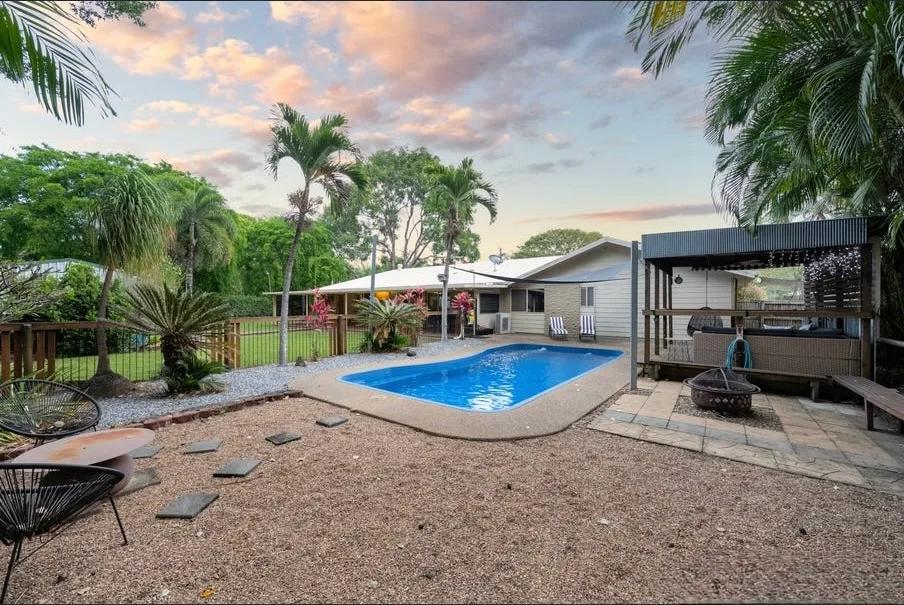
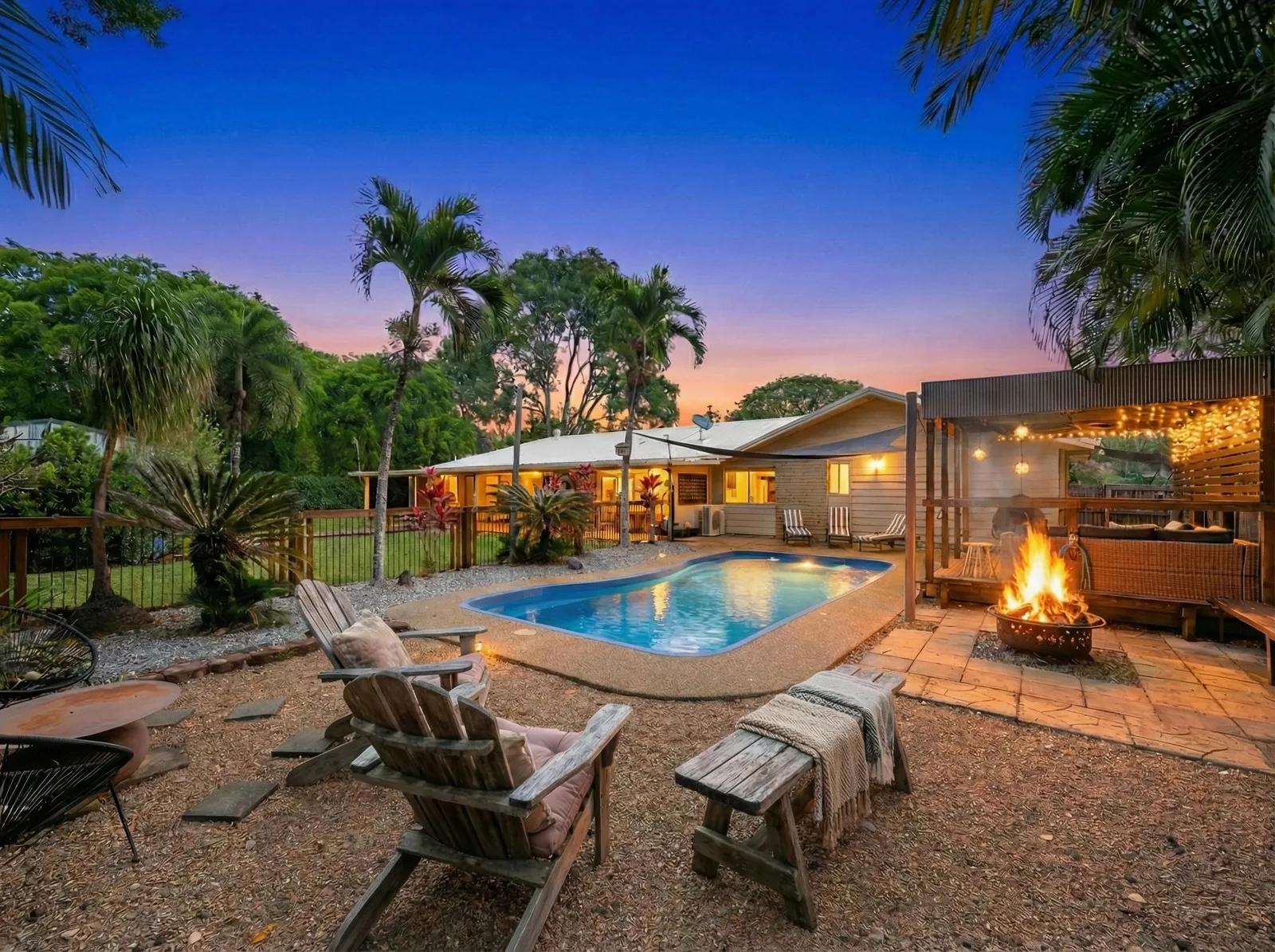
What Is a Day to Dusk Conversion?
A day to dusk conversion is a photo edit that transforms a daytime property photo into a twilight scene, replacing a plain daylight sky with the warm colours of sunset and adding a soft evening glow. Traditionally this meant either shooting at dusk during a narrow window of good light, or spending time on a manual day to dusk edit in Photoshop. We do it with AI instead: you upload the daytime shot, and we generate the dusk version — sky, warmth, and window light included — from that single image.
Real estate photographers prize the twilight look because it makes a home feel inviting and premium. Our tool gives you that same golden-hour result on demand, from photos you already have, so every listing can lead with a standout hero image.
How to Convert a Day Photo to Dusk
Turning day into dusk takes three steps and no editing experience:
- 1Upload your daytime photo — Add an exterior shot taken in daylight, straight from your phone or camera.
- 2Apply day to dusk — We replace the sky, warm the lighting, and add a natural evening glow to the property.
- 3Download or regenerate — Save your twilight photo in high resolution, or regenerate for a different sky and mood.
There’s more to a convincing dusk shot than a pretty sky. We balance the new sky against the light on the building, warm the exterior tones so they match the hour, and lift the interior window light so the home reads as lived-in and welcoming — the details that separate a believable twilight image from an obvious paste-in.
Why Day to Dusk Photos Sell Listings
A twilight hero image is one of the most reliable ways to make a listing stop the scroll. Warm light reads as home, and a glowing dusk exterior stands out in a feed of flat daytime thumbnails. Here’s why agents and photographers lead with it:
- A hero image that gets the click — Dusk exteriors draw the eye on portals and social, lifting views on your listing.
- A premium, aspirational feel — Golden-hour light makes a home look warm, high-end, and move-in ready.
- No waiting for the weather — Skip the narrow dusk shooting window; convert a daytime shot any time of day.
- Rescue a grey-sky shoot — Turn flat, overcast exteriors into warm, inviting scenes.
- Consistent results every time — Every property gets the same standout treatment, no matter when it was photographed.
Which Photos Work Best
Day to dusk works best on exterior photos with a clear view of the sky and the front of the property. You’ll get the strongest results from:
- Front-of-house exteriors — the classic street-view hero shot with visible sky.
- Homes with windows in frame — so we can add that warm, glowing interior light.
- Gardens, pools, and outdoor areas — twilight makes outdoor features look especially inviting.
- Daytime shots with even light — clean, well-exposed photos give the AI the most to work with.
AI Day to Dusk vs Photoshop and Editing Services
There are three ways to get a day to dusk photo, and they’re not equal on time or cost:
- Manual day to dusk in Photoshop — full control, but it takes real skill and can run 15–30 minutes per image.
- Outsourced day to dusk editing services — hands-off, but you wait 12–48 hours for turnaround and pay per photo, with revision rounds if it’s not right.
- AI day to dusk with Enhancia — you upload and get a finished twilight image in seconds, keep full control, and pay per photo with no lock-in.
If you edit occasionally and love Photoshop, the manual route works. If you’d rather not wait on an editing service or learn masking and sky replacement, our AI gives you the same golden-hour result on demand.
Inputs & Outputs
Keep Your Listings Honest
- A day to dusk edit changes the time of day and lighting in your photo — not the property. The building, its features, and its surroundings stay exactly as they are; we only relight the scene to the golden hour. Many portals and boards appreciate a note that a hero image is a twilight enhancement, so it’s good practice to present these as the enhanced photos they are and check the disclosure rules where you list. Used honestly, a dusk shot is simply your property shown at its best hour.
Frequently Asked Questions
What is day to dusk in real estate photography?
Day to dusk is a photo edit that turns a daytime exterior into a twilight scene, adding a sunset sky, warm lighting, and a soft evening glow. It gives a listing a warm, premium hero image without shooting at dusk.
How do I convert a day photo to dusk?
Upload your daytime exterior photo, apply our day to dusk tool, and download the twilight result. We handle the sky, the warm tones, and the window light in seconds, with no editing skills needed.
Is AI day to dusk better than doing it in Photoshop?
AI manual day to dusk edit in Photoshop gives full control but takes skill and 15–30 seconds per image. Our AI produces a comparable twilight result in seconds, so it’s faster for anyone who doesn’t want to mask skies and relight by hand.
Is there a free way to do day to dusk photo editing?
Yes. We give you 10 free credits when you start, so you can try AI day to dusk conversion before buying any credits.
Do I need a special photo for day to dusk to work?
A daytime exterior with a clear view of the sky and the front of the property works best. Well-exposed, evenly lit shots give the AI the most to work with.
Does day to dusk change the property in the photo?
No. We only change the time of day and lighting. The building, its features, and its surroundings stay exactly as they appear in your original photo.
Related Tools
AI Real Estate Photo Enhancer
Our AI real estate photo enhancer gives you targeted control over the issues that make listing photos feel unfinished. Upload a property image, choose the edit it actually needs, and we improve that specific part of the photo — from colour and white balance to perspective, sky, clutter, facade presentation, or resolution. Instead of pushing one generic filter across the whole image, we help you refine the photo in focused passes, review the result, and keep building toward a clean, listing-ready finish.
Virtual Staging
Furnish an empty room in a photo without moving a single piece of furniture.
More resources
Read related guides in the Enhancia Knowledge Base, or see full pricing details on the pricing page.